

Important Programming Topics for 3D Artists
Gain confidence in what's going on under the hood
The tools we use have progressed to the point where they can feel like PFM (Pure Flippin’ Magic). While 3D artists do not necessarily need to be expert programmers, having a basic understanding of programming concepts can be helpful in creating 3D models and animations. Here are some of the most important programming topics for 3D artists to be aware of.
Note: this article will not make you an expert on any of these topics. The goal here is for you, as an artist, to gain a broad understanding of what programming topics you should be aware of and what they are so you can understand what any programmers you work with mean when they try to explain complex topics. I have bolded the important terms to recognize.
Scripting vs Programming
In general, programming languages (e.g. C, C++) go through a compiler, and scripting languages (e.g. Python, Javascript) use an interpreter. The compiler takes the source code (human-readable) and translates it a single time into the machine code (zeros and ones, not human-readable) the computer’s hardware needs to run. An interpreter executes the source code line-by-line and converts it into machine code on the fly.
What is the significance of this to me?
Not much.
Compiled code tends to run faster. Interpreted code is slower, but it tends to be more forgiving because a single mistake doesn’t break the whole process.
In practice, computing hardware has advanced enough today that the difference between these isn’t nearly as big as it used to be, and if you refer to Python as a programming language only the most ardent of gatekeepers will call you out on it. Don’t worry about those people.
Application to 3D Art
Scripting languages are great for automating tasks, but you really need speed for things like 3D modeling and rendering. Therefore, a tool like Blender will have its core functionality written in C and C++. Blender uses Python for interfacing with add-ons and some other tools.
If you have minimal programming experience and just want to automate a few tasks, this is good news for you. Python is much easier to learn and more forgiving than C++.
Variables and Data Types
In programming, a variable is like a container that can hold a value.
Python has several built-in data types that you can use to assign values to variables. The most common data types are:
- Integers: These are whole numbers (positive, negative, or zero), like 42 or -7. For example, these can specify how many times an object gets copied.
- Floats: These are “floating point” decimal numbers, like 3.14159 or -10.5. You can use floats to store numbers with decimal points, such as measurements, object coordinates, rotation angles, etc.
- Strings: These are sequences of characters, enclosed in quotation marks, like “Hello, world!” or “Blender is awesome!”. These store text values such as object and collection names.
- Booleans: These are either True or False and are often used in conditional statements (more on that later). Think of a checkbox: it’s either checked (True) or it isn’t (False).
- Enum: Short for enumeration, these provide a set of discrete options. Only one thing can be true. For example, a picture is either in color, or it is in black and white. It can’t be both.
If you’ve used art or other software tools for a while, I guarantee you’ve seen these in action before in the interfaces. They’re everywhere, but you may have just not known the words for them. Check out this screenshot from the Blender output properties menu to see these in action.
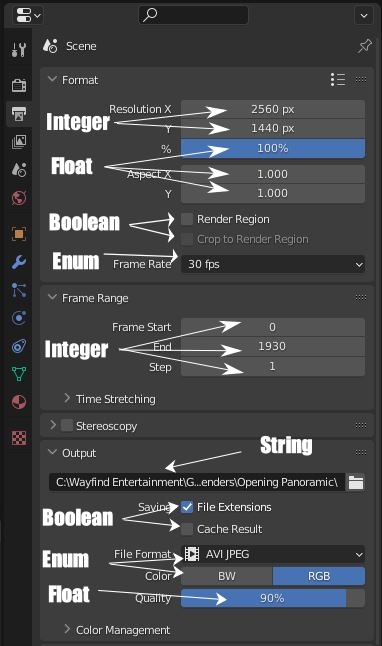
Note that even though some of them have labels (e.g. 2560 px, 90%), these are just user-friendly displays for your benefit. Blender stores and uses them in the data types it needs (integer 2560 and float 0.9, respectively).
Object Oriented Programming
Object Oriented Programming (OOP) is a way of making code more modular and reusable. Say you’re writing a program that will imitate drawing with a pen or pencil. Instead of rewriting a bunch of source code common between 50 different colors of pens and again for pencils, you can consolidate them into an object class. Let’s call it “Writing_Instrument”.
This object can have several different properties made up of the data types we just discussed.
- Type (enum: Pen or Pencil)
- Color (Integers for Red, Green, and Blue channels)
- Opacity (Float, 0.0 to 1.0)
- Thickness (Float, 0.0 to 1000)
Our class can also have methods that go along with it.
- Start Drawing
- Stop Drawing
- Start Erasing
- Stop Erasing
Now, I can use this in my script by making an instance of the object. This keeps all the code in one place and makes it easier to maintain and improve.
Application Programming Interfaces
APIs (Application Programming Interfaces) are rulesets and protocols that allow different software programs to communicate with each other.
If the source code in a project is the behind-the-scenes work, the API is the public-facing code that you want developers to use. For example, I use Stripe as my credit card payment gateway provider. Neither they nor I want me to access the source code and database they have with everyone’s financial information. Instead, they created an API that I can tap into from the website that gives me access to only the functionality I need.
Many 3D software packages (e.g. Blender) have APIs that allow programmers to create custom plugins and scripts to extend their functionality. Check out Hello 3D World! The Complete Guide to Creating Blender Add-ons to learn how to tap into that API and make your own add-ons for Blender.
Version Control
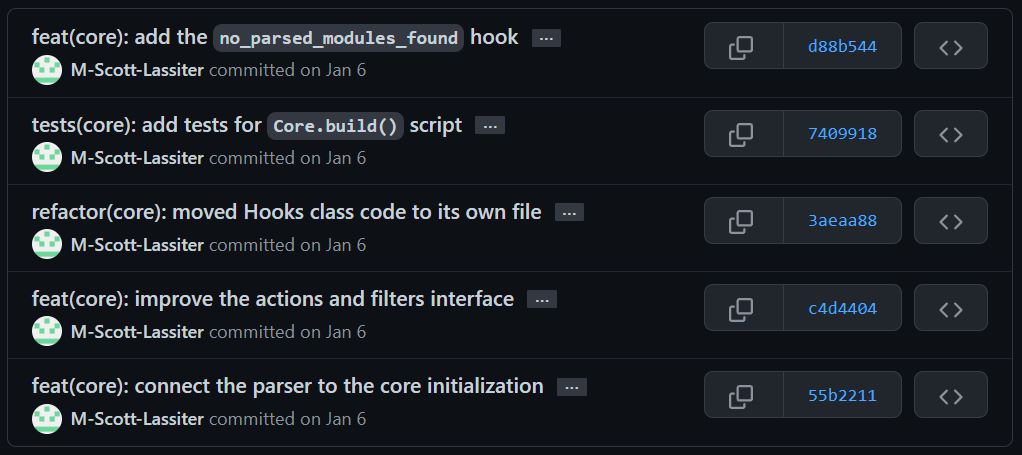
Version control software helps developers track changes to code and contribute to large projects. Git has become one of the leading software industry standards.
For the Graphic Art Quest open-source tools, I use Git and host it on GitHub.
How Does Git Work?
Imagine you’re collaborating on a group project. You have an idea for an exciting new feature to add on but you don’t want to risk breaking the project that’s already running with active users (like Blender).
So, You can create a new branch on the project, make your changes, and commit the code changes. Then, you push the changes back to the repository and ask for the project manager to review them by opening a pull request.
Once approved, the manager will merge them into the main repository. Now, everyone else working on this project will have access to these new changes as well. Git tracks all the changes so you can go back in time and see all the different versions to understand how things have involved, who made which changes, and why.
This is a gross simplification of the system. Git includes ways to resolve conflicts if two people tried to change the same lines of code, rollback changes, and more if you really want to dive into it.
Alternatives to Git for Large Files
Git works great for written code because it tracks additions and subtractions line by line. However, 3D models, textures, and scenes aren’t text files, they’re binary files (i.e. ones and zeros, and not human readable). Git will track a change to one of these assets, but it has to track the entire file. Therefore, you lose the version control benefits. Over time, this can quickly add up and bog down the Git repository which can make it miserable to work with.
Thankfully, some smart developers have created alternatives that can support these kinds of files, such as:
- Subversion
- Perforce
- Git Large File Storage (Git LFS)
Within the 3D industry, Perforce and Subversion have grown in popularity because they handle large file version control well. Git LFS can also help here, and GitHub supports it.
Project Management Frameworks
Programmers have adopted numerous project management frameworks throughout the years that you might hear them talking about.
Waterfall
The Waterfall model is a linear approach to project management that involves a sequential series of phases. Each phase must be completed before moving on to the next, and there is little room for change once a phase has been completed.
Waterfall is best suited for projects with well-defined requirements and a clear understanding of what needs to be delivered. This used to be the most common approach to software but has fallen out of favor due to its inflexibility. It can still be useful in things like building houses where you have predictable steps and a good idea of what has to happen before other steps (e.g. pipes and wires in walls before sheetrock).
Agile
Agile is an iterative and incremental approach to software development that emphasizes collaboration, flexibility, and customer satisfaction. It involves breaking down a project into smaller, more manageable chunks called sprints. Each sprint is self-contained and takes the project from a stable state to a new stable state, usually over the course of around 4 weeks.
Therefore, instead of rolling out a year’s worth of changes all at once, you can push out smaller changes to your community faster. The users get the tool, you get the feedback, and you minimize (but never eliminate) wasted time on code branches that won’t benefit the users.
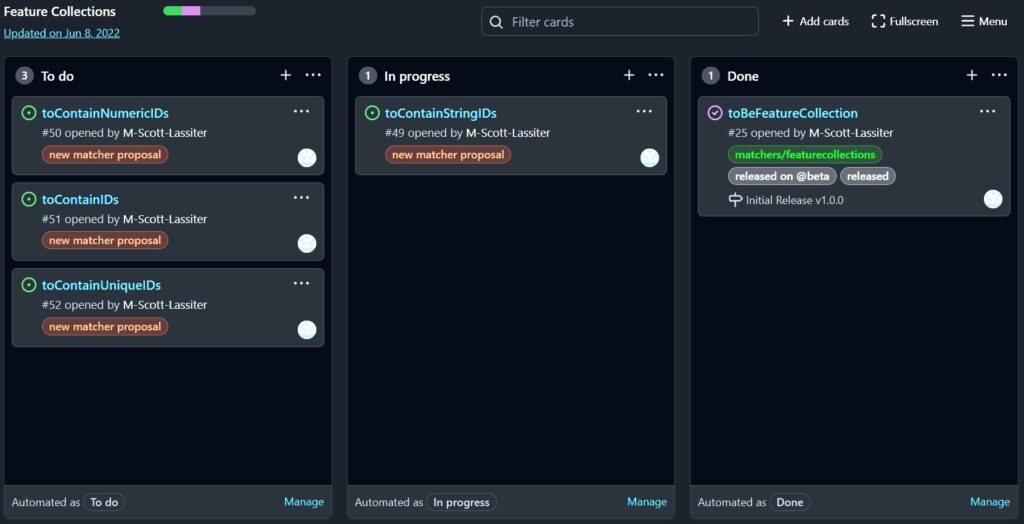
Agile methods such as Kanban boards are widely used in software development. In a Kanban board, you track your backlog of tasks from to-do through completion. If you use GitHub, their Kanban tool is free with no premium upgrading required.
DevOps
DevOps is a software development methodology that integrates development and operations together. It involves continuous delivery, testing, and deployment of software, also known as CI/CD (Continuous Integration, Continuous Deployment).
It focuses on automation and monitoring to ensure rapid and reliable delivery.
Conclusion
While this subject may seem daunting at first, these are important programming topics for 3D artists to know about. Having at least a base level of familiarity can greatly enhance your skill set and help you create more complex and engaging 3D models and animations.
Fortunately, there are many online resources and tutorials available for learning programming concepts, even for those with no prior experience.
Happy coding!


